LLM inference
benchmarks.
Can you run local AI effectively? Understanding what goes into LLM inference — and the performance you can expect from your repurposed hardware.
llama.cppCUDA & MetalRTX 3080 / M4 Mac Mini
01Inference Fundamentals
02Benchmark Scope & Setup
03Baseline Throughput
04Prefill Performance and Microbatch Scaling
05RTX 3080 VRAM Utilization
01
Inference Fundamentals
Hosting an LLM locally requires an engine which loads a pre-trained model and manages the computational resources required to generate responses. This process requires sufficient processing capacity and memory to accommodate the model’s weights and key-value (KV) cache.
Selecting an Inference Engine
The choice of inference engine can significantly impact performance. The optimal choice depends on the specific use case and amount of control required. Common choices include but are not limtied to:
- llama.cpp: A strong choice for local inference and detailed performance tuning, with broad hardware support and flexible CPU/GPU offloading.
- Ollama: Offers streamlined model deployment and management.
- vLLM: Ideal for GPU servers that handle concurrent requests and need to scale during demand spikes.
A general overview, not a universal ranking.Ollama streamlines setup and model management, but that convenience can introduce performance overhead. llama.cpp does not introduce as much overhead and also enables for performance tuning but requires familiarity with build systems (CMake). Similarly, vLLM also adds setup and runtime complexity as compatibitly must be considered across several dependancies.
02
Benchmark Scope & Setup
The engine of choice for the benchmarks was llama.cpp which was built from source. The two test platforms were a Windows PC with a dedicated NVIDIA RTX 3080 GPU and an M4 Mac Mini. Idle VRAM utilization was minimized in the Windows environment by disabling 3D applications and displays during testing.
The benchmarks evaluated four key metrics:
- Generation throughput: The rate that tokens are generated by the model.
- Prefill performance and Microbatch scaling: The rate at which prompt tokens are processed and how that rate changes with the number of prompt tokens processed together in physical batches. This directly affects when the first token is generated.
- GPU memory utilization: The total VRAM consumption on the RTX 3080 during workloads.
The three open weight model families tested were:
Model selection is arbitrary.The family of models above were not selected to suggest they are optimal choices for local AI. Rather they were selected due to their size being compatible with 10GBs of VRAM and also being available in many different quantized formats.
03
Baseline Throughput
Throughput was measured across several output lengths, with 100 GPU-only runs per length for each of three model quantizations. Benchmark scripts and full results are linked below. The tables report mean throughput ± one standard deviation for the shortest (3,277 tokens) and longest (13,107 tokens) output lengths.
Windows / RTX 3080: Benchmark script (.bat) · Raw JSON results on GitHubmacOS / M4: Benchmark script (.sh) · Raw JSON results on GitHub
Llama 3.2 3B is the fastest model on both test platforms whereas Phi 3.5 Mini is the slowest. We also see that Q5_K_M's smaller weights require less memory bandwidth per token than Q8_0's 8-bit weights, resulting in higher throughput in every model. The longer outputs show slower throughput as they give each new token more previous tokens to attend to. This increased computational load per token is most prevalent in the reduced throughput of Phi 3.5 Mini where the 13107 token workload is between ~30% - 38% slower than the 3277 token workload.
Smaller quantized weights can reduce output quality. Always test outputs on representative tasks. Future works will examine these trade-offs.
04
Prefill Performance and Microbatch Scaling
Prefill processes the input context before output tokens are generated. The prefill rate was measured for all 3 model families at the Q8_0 quantization across 100 runs for different microbatches (n_ubatch) and input prompt sizes. The mean prefill rate ± one standard deviation for the microbatch sizes of 512 tokens and 2048 tokens is reported in the table below. The batch size (n_batch) was held constant at 2048 for all runs as the engine requires that n_batch >= n_ubatch. The benchmark scripts and full results are available below.
Batch sizesn_batch is the maximum logical token batch; n_ubatch limits how many tokens from that batch are processed at once. Since more tokens are available to process during prefill, n_ubatch impacts prompt processing.
Windows / RTX 3080: Benchmark script (.bat) · Raw JSON results on GitHubmacOS / M4: Benchmark script (.sh) · Raw JSON results on GitHub
Llama 3.2 3B is the fastest model on both platforms, while Qwen3 4B is the slowest. Increasing the microbatch size from 512 to 2048 improves RTX 3080 throughput by 8-12% for 2048-token prompts. This jump in performance is not observed on the M4 Mac-Mini as all available compute was already occupied at n_ubatch=512.
05
RTX 3080 VRAM Utilization
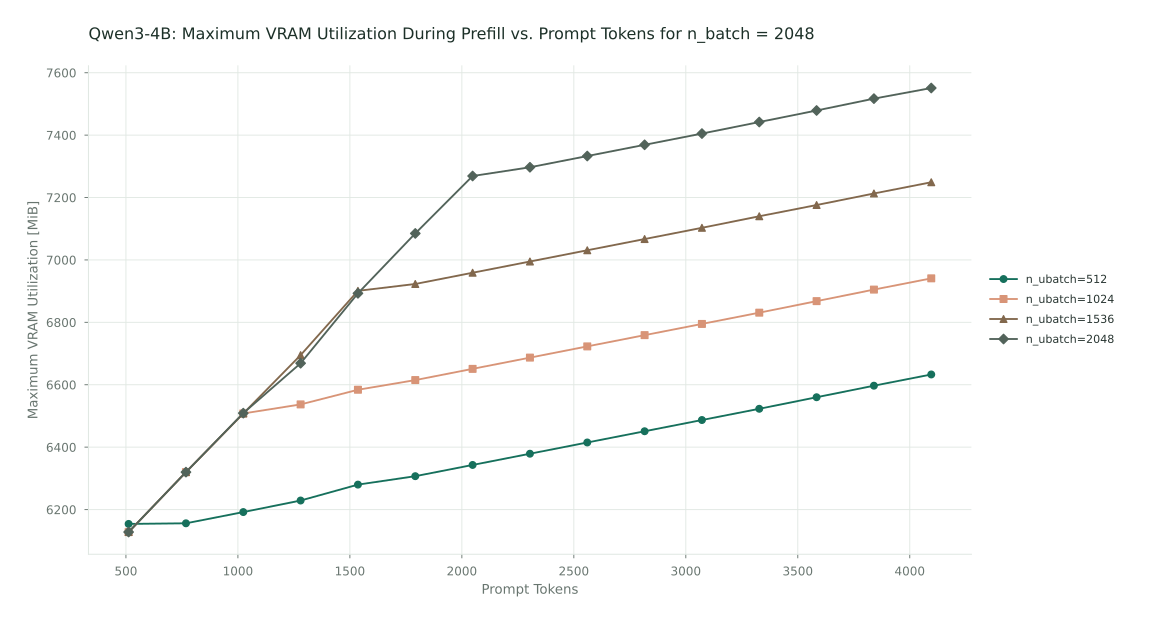
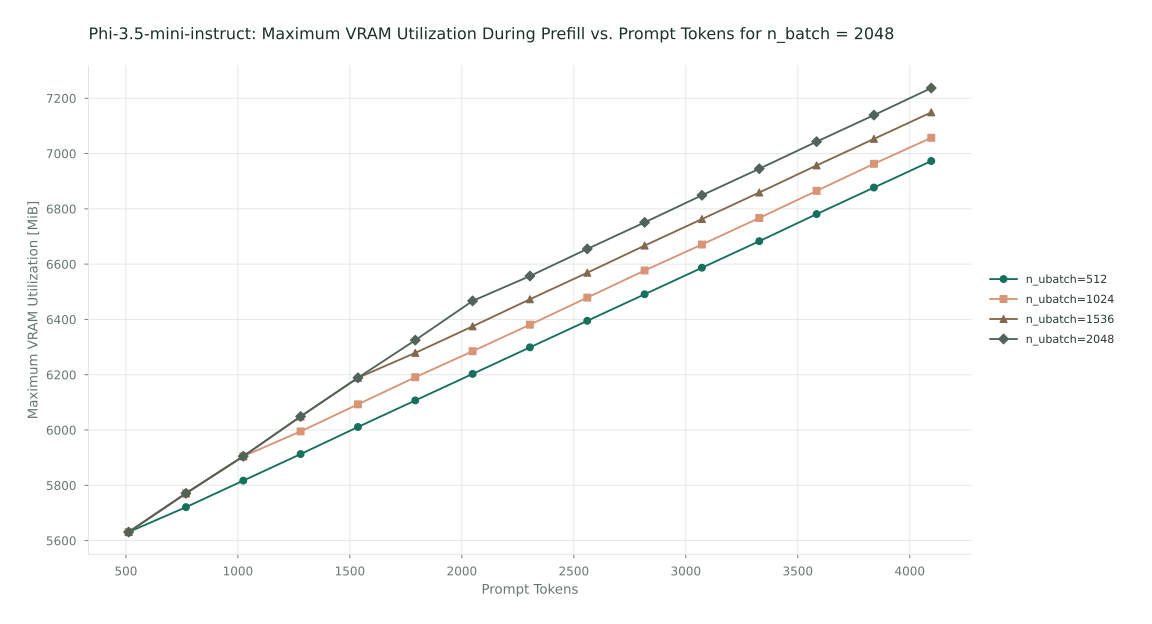
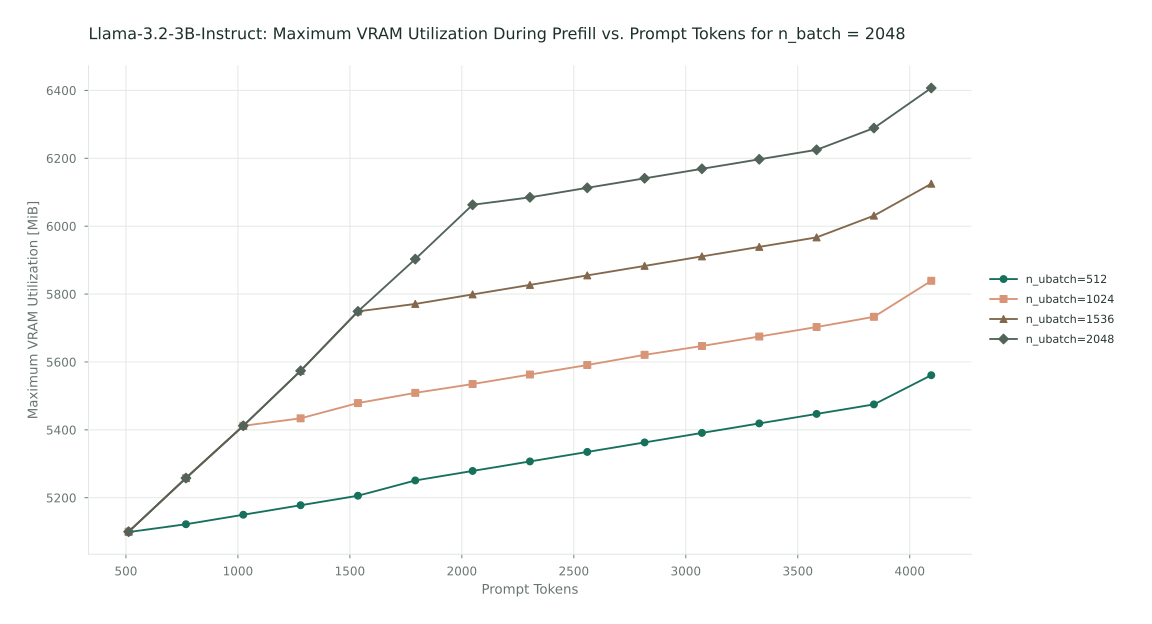
llama.cpp sizes its compute buffers to accommodate the configured microbatch size (n_ubatch). Larger microbatches generally require more memory for intermediate calculations. In the graph below, you can see how the maximum memory utilization varies with different microbatch and input prompt sizes. All models are with quantization Q8_0.
When the prompt size is less than n_ubatch, llama.cpp will increase memory utilization to process more tokens at once. However, when the prompt size is greater than n_ubatch, llama.cpp will reuse compute buffers for processing the additional tokens. This is noticed by the slope of Peak VRAM Utilization being less steep for n_prompt > n_ubatch.
Upcoming work
Future benchmarks will explore how Multi-token Prediction can improve throughput as well as how effective these models are in Agentic workflows.